
Download StoriesOnBoard – AI‑Powered User Story Mapping Tool for Agile Teams
Overview
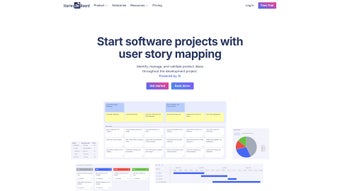
StoriesOnBoard is a subscription‑based, web‑hosted platform that brings AI‑driven intelligence to the classic practice of user story mapping. Designed specifically for Business Analysts, Product Owners, and agile‑focused development squads, the tool offers a visual, collaborative canvas where product specifications, requirements, and road‑maps can be assembled, refined, and shared in real time. By turning abstract backlog items into concrete story maps, the solution makes it easier for non‑technical stakeholders to grasp the big picture while still giving technical teams the granularity they need for sprint planning. Integrated with popular communication channels such as Slack and email via Zapier, StoriesOnBoard ensures that feedback loops remain tight and that updates travel instantly across the organization. Whether you’re running a two‑person startup or coordinating a distributed enterprise team, the platform scales to match the size and velocity of your agile workflow, delivering a single source of truth for product vision, prioritization, and delivery timelines.
Key Features That Set StoriesOnBoard Apart
- AI‑Assisted Brainstorming: Generate user personas, acceptance criteria, and technical requirements with a single click.
- Interactive Story Maps: Drag‑and‑drop cards to visualize user journeys, goals, and epics.
- Roadmap View: Convert story maps into high‑level product roadmaps that can be shared with executives.
- Zapier & Slack Integration: Automate notifications, create tickets, or push updates directly to your preferred tools.
- Collaborative Editing: Real‑time co‑authoring with version history and comment threads.
- Custom Templates: Save and reuse mapping structures for recurring projects.
- Export Options: PDF, CSV, and JSON exports for offline analysis or archival.
- Permission Controls: Role‑based access to protect sensitive backlog items.
The AI engine behind StoriesOnBoard does more than just suggest text – it analyses existing backlog items, identifies gaps in user flow, and recommends prioritization based on business value and effort estimates. This proactive assistance reduces the time spent on manual research and helps teams converge on a shared understanding faster. The visual story‑mapping canvas is built on a responsive grid, allowing users to zoom in on detailed cards or zoom out for an executive‑level view without losing context. The roadmap feature automatically rolls up stories into quarterly milestones, giving product leadership a clear forecast of delivery dates and dependencies. Integration with Zapier means you can trigger a Slack message whenever a high‑priority story is moved to “Done,” or automatically create a Jira ticket from a new card, keeping all downstream tools in sync. Altogether, these capabilities turn StoriesOnBoard into a central hub for product discovery, planning, and continuous delivery.
Installation, Setup & Cross‑Platform Compatibility
Because StoriesOnBoard is a cloud‑native SaaS solution, there is no traditional “installation” process. Getting started is as simple as visiting the official website, signing up for a free 14‑day trial, and creating your first workspace. The onboarding wizard walks new users through the creation of a project, the definition of high‑level goals, and the addition of the first set of user stories. You can invite teammates by email, assign them roles (Admin, Editor, Viewer), and start collaborating instantly—all within a secure HTTPS environment.
The platform runs entirely in the browser, which makes it compatible with virtually any operating system that supports modern web standards. Whether your team works on Windows 10/11, macOS Ventura, Linux distributions, or mobile devices running Android 9+ or iOS 14+, the experience remains consistent. For teams that require offline access, StoriesOnBoard offers a progressive web app (PWA) mode: you can “install” the web app on your desktop or mobile device, and the client will cache the latest board data for viewing and minor edits while disconnected. Once connectivity is restored, changes synchronize automatically.
Supported operating systems: Windows, macOS, Linux, Android, iOS (any recent browser).
Security‑wise, the service complies with GDPR and SOC 2 standards, encrypting data at rest and in transit. Administrators can enable single sign‑on (SSO) via SAML or OAuth providers such as Okta, Azure AD, or Google Workspace, ensuring that only authorized personnel can access your product backlog. After the trial, you can choose a subscription tier (Professional, Enterprise, or Custom) that best matches your team size and integration needs. Billing is handled securely through Stripe or PayPal, and you can cancel or upgrade at any time directly from the account dashboard.
Pros, Cons and Frequently Asked Questions
Pros
- AI assistance dramatically reduces the time needed for persona and acceptance‑criteria creation.
- Intuitive visual mapping makes complex backlogs easy to understand for all stakeholders.
- Full‑stack integrations (Zapier, Slack, Jira, Azure DevOps) keep the tool in sync with existing workflows.
- Browser‑based access eliminates the need for local installations and supports all major OS platforms.
- Robust permission system safeguards sensitive product information.
Cons
- Pricing is subscription‑only; there is no perpetual‑license option for teams with strict budgeting.
- Advanced AI features are limited to higher‑tier plans, which may be a barrier for very small startups.
- Export formats are useful but lack direct native integration with some legacy PM tools.
- Learning curve for non‑technical stakeholders can be steep without proper onboarding.
- Offline PWA mode supports only read‑only or minor edits; full offline editing is not yet available.
FAQ
- Is StoriesOnBoard a free tool?
- No. StoriesOnBoard offers a 14‑day free trial, after which you must select a paid subscription plan (Professional, Enterprise, or Custom).
- Can I integrate StoriesOnBoard with Jira?
- Yes. Through Zapier or native API connections, you can sync story cards to Jira issues, keeping your development board up to date automatically.
- Does StoriesOnBoard support single sign‑on (SSO)?
- Absolutely. The platform supports SAML‑based SSO and OAuth providers like Okta, Azure AD, and Google Workspace.
- Is there a mobile app for StoriesOnBoard?
- There is no dedicated native app, but the responsive web interface works seamlessly on Android and iOS browsers. A PWA can be installed for a more app‑like experience.
- How secure is my data on StoriesOnBoard?
- All data is encrypted in transit (TLS 1.2) and at rest (AES‑256). The service complies with GDPR, SOC 2, and ISO 27001 standards.
- Can I export my story maps for presentations?
- Yes. You can export boards as PDF, CSV, or JSON files, which can be embedded in PowerPoint decks or shared with external stakeholders.
Conclusion – Should You Download StoriesOnBoard?
For agile teams that need a visual, collaborative way to translate high‑level product visions into actionable user stories, StoriesOnBoard delivers a compelling blend of AI‑enhanced creativity and robust integration capabilities. The platform’s strength lies in its ability to bring non‑technical stakeholders into the conversation without sacrificing the depth required by developers. While the subscription pricing model may deter very small outfits, the productivity gains—especially the time saved on brainstorming and backlog grooming—often justify the cost for growing product groups. If you’re looking for a secure, browser‑based solution that works across Windows, macOS, Linux, Android, and iOS, and you value seamless connections to tools like Slack, Jira, and Azure DevOps, StoriesOnBoard is well worth a test run.
Ready to experience AI‑driven story mapping for yourself? Start your free trial today and see how visual collaboration can accelerate your product delivery cycle.



.png)



